Softime
EN⌃
Try for free

Time tracking for consulting firms, project by project

Your team logs time against each client, project and task from a browser or phone. You see how much time each project takes, how much is billable and how much you spend on each client.

  • Hours by client and project
  • Billable hours
  • Rate per consultant
  • Reports by client
Client report

Grupo Alzira

October 2026 · 3 projects

Export to Excel
Example client report
ProjectTotalBillable
2027 strategic plan86:3078:00
Process audit42:1540:00
Executive training12:000:00
Total hours
140:45
Billable hours
118:00
Amount at each consultant’s rate
€10,620.00
Illustrative example
How it works

See where each project’s time goes

Hours by client, project and task

Each project belongs to a client and is split into tasks: interviews, analysis, reports and presentations. Use tags to group work by type or area, however you need.

  • Tasks created as you type, without forms
  • Tags to break down time however you need
  • A context note on each entry when needed
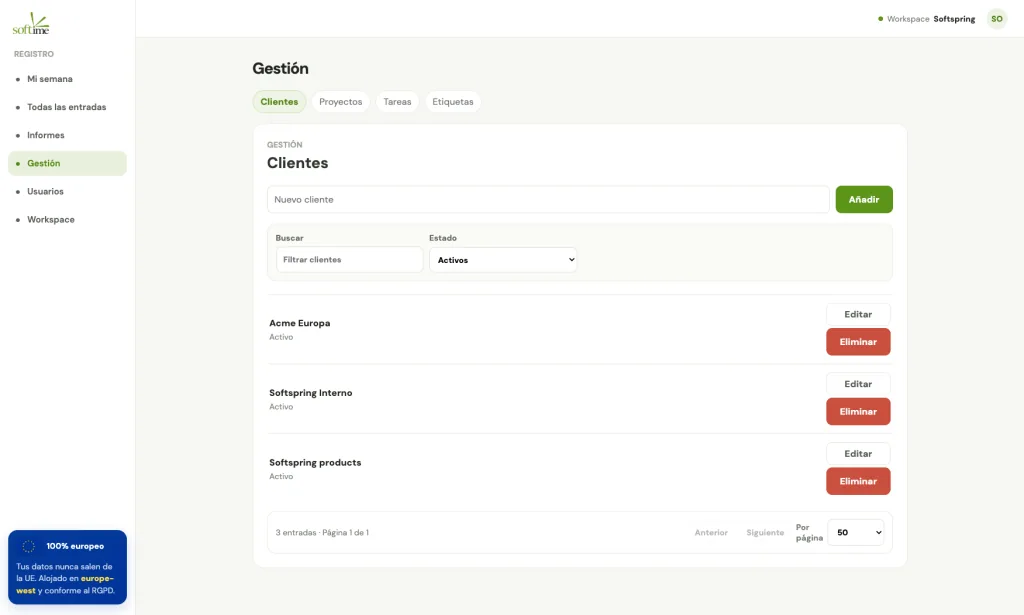
Clients, projects and tasks in Softime

Billable hours and amounts per consultant

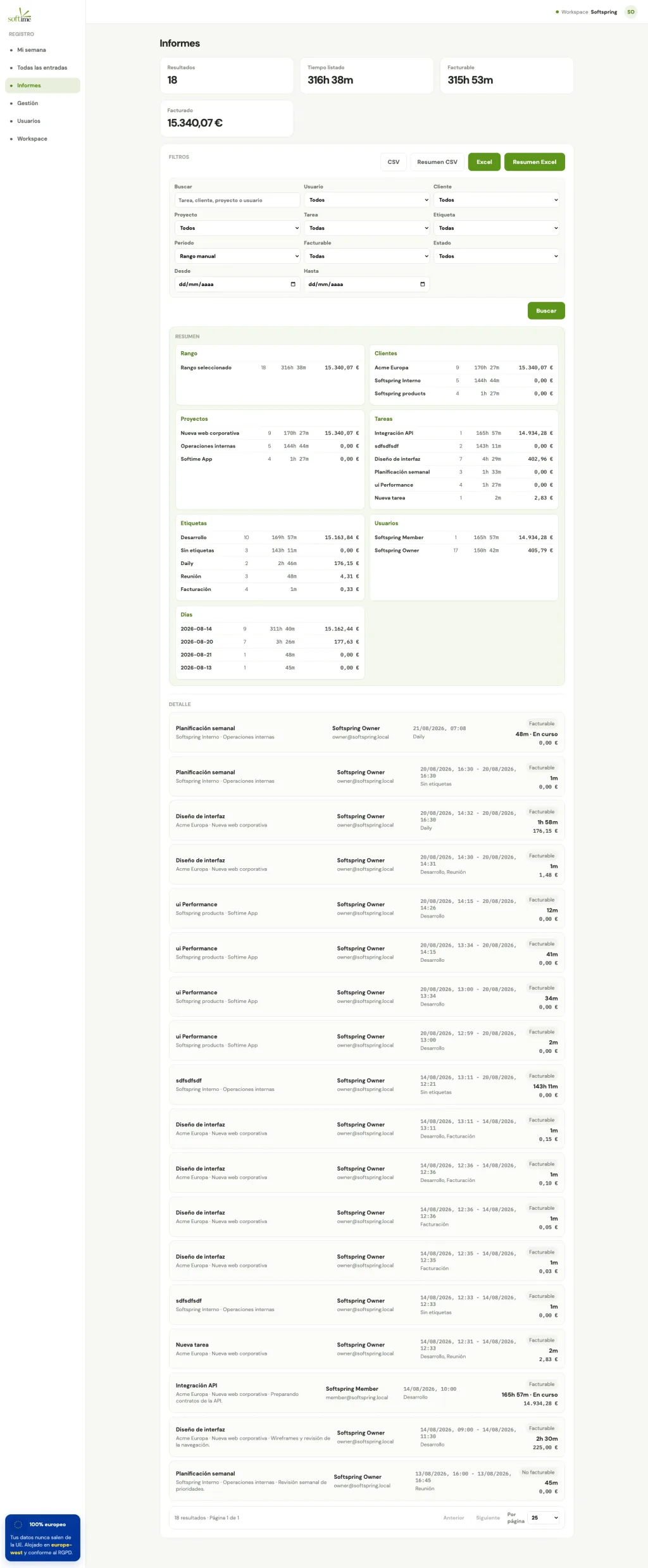
Mark which time is charged to the client and apply each person’s hourly rate. Reports show hours and amounts by client, project, task, tag or person.

  • Billable and non-billable hours shown separately
  • Hourly rate per consultant
  • Export to Excel and CSV
Hours report by client in Softime

Log time in one click

From the browser extension while you work, or from your phone after a client meeting.

Your week at a glance

Repeated entries on the same day are grouped automatically, so each consultant can review their week on one screen.

Roles for your team

Admin, manager and member roles to decide who manages clients and projects.

Your data in Europe

Your client information, hosted in Europe

Time records, clients and projects are hosted in Europe. Hosting and payment providers are European and process that data in Europe.

Read the privacy policy →
Softime providers
ServiceProviderLocation
Hosting and databaseScalewayFrance
PaymentsMollieNetherlands
Application emailBrevoFrance
AnalyticsPlausibleGermany
Support teamSoftspringSpain

Support is currently handled by email through Google Workspace. Your contact details and message content may be processed outside the European Economic Area. We are working to provide support from European infrastructure too.

Moving from Clockify or Toggl?

The Clockify and Toggl importers bring over all your hours, not just the last month. Clients, projects, tasks, tags and billable hours come across as you had them.

How importing works →
Pricing

One plan. Everything included.

Try Softime free for 2 months with all features. Then pay only for the people who track time.

Choose how to pay

Softime

2 months free
€2.50per person/month

Billed monthly after the trial. Cancel whenever you want.

Start 2 months free

No card needed for the trial

Includes

  • Browser extension and mobile app
  • Time by task, project and client
  • Billable hours and amounts by project
  • Reports by client, project, task and person
  • Clockify and Toggl importers with your complete history
  • Export to Excel and CSV
  • Roles: admin, manager and member
  • Support from Spain in your language
EU-hosted dataNo setup fee or lock-inVAT not included

Softime is not an attendance tracking tool

It measures time spent on tasks and projects, rather than clock-in and clock-out times. Use a dedicated tool if you need attendance tracking.

Frequently asked questions

Can I organise hours by client and project?

Yes. Each client has projects and each project has tasks. Tags also let you group time however you need.

Can I track a project’s phases?

Yes. Use tasks or tags for the phases in your proposal. Reports show how many hours each phase has taken.

How do I know how much to bill each client?

Mark billable hours and set each consultant’s hourly rate. The client report shows hours and amounts, ready to export to Excel or CSV.

Can I bring my hours from another tool?

Yes. The Clockify and Toggl importers bring your full history, including clients, projects, tasks, tags and billable hours.

Can Softime track attendance?

No. Softime measures time spent on each project and task. It does not record clock-in and clock-out times or meet Spain’s mandatory working-time registration requirements.

Where is the data hosted?

Time records and backups are hosted on Scaleway in France. Payments are handled by Mollie in the Netherlands. Our hosting and payment providers are European and process that data in Europe. Messages sent to support are handled by email through Google Workspace and may be processed outside the European Economic Area. We are working to move support to European infrastructure too.

Who is behind it

We built it for ourselves first

Softspring is a web development and AI agency in Spain. We work by project and needed to know how many hours each one took, with our data in Europe. We could not find the right tool, so we built it. We use it every day.

Meet the team

Start tracking time today

Two months free with every feature. Add your clients and projects or bring them over from Clockify or Toggl, and start logging time today.

Try 2 months free

Write to us

Support is currently handled by email through Google Workspace. Your contact details and message content may be processed outside the European Economic Area. We are working to provide support from European infrastructure too.